SlipRight text messages
SlipRight is marina management software from SlipRight LLC. Boat owners can choose to get text messages from SlipRight about their account at the marinas where they keep a boat. Texts come from SlipRight’s number, (888) 655-6450, and name the marina they are about. No marketing is ever sent.
How you turn them on
Only you can turn texts on. A marina can’t sign you up, and texts are off until you do.
- Sign in to SlipRight on your phone, at go.slipright.app, or in the desktop app, and open Account, then Notifications.
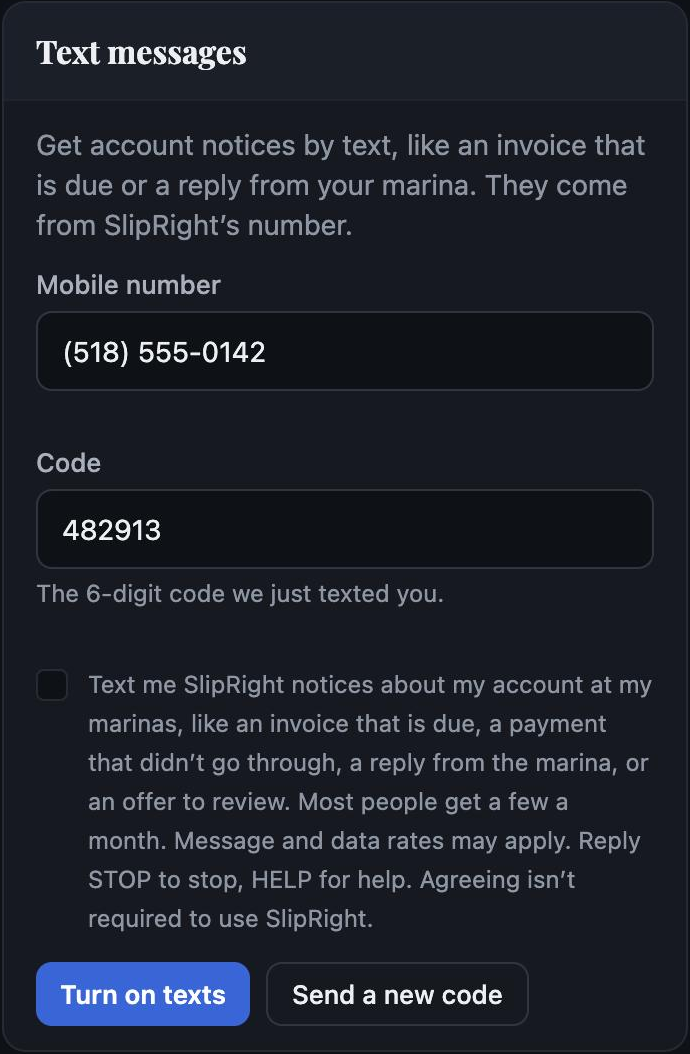
- Under Text messages, enter your mobile number and choose Send code.
- Enter the 6-digit code we text you.
- Tick the box to agree to the words below, then choose Turn on texts. We record the time and the words you agreed to.
What you agree to
Text me SlipRight notices about my account at my marinas, like an invoice that is due, a payment that didn’t go through, a reply from the marina, or an offer to review. Most people get a few a month. Message and data rates may apply. Reply STOP to stop, HELP for help. Agreeing isn’t required to use SlipRight.
The box starts unticked. Texts are covered by our Terms and Privacy Policy. We do not share or sell mobile numbers or text consent with anyone for marketing.
What you get
- An invoice that is due, or a payment that didn’t go through.
- A reply from your marina to your message.
- An offer from your marina to review.
How many depends on your account; most people get a few a month. No texts are sent between 9 PM and 8 AM. You choose which of these come by text in the same Notifications panel, and everything that matters also comes by email and waits in the app.
Examples:
- SlipRight: Your code is 482913. It expires in 10 minutes.
- SlipRight: You’re signed up for account texts from your marinas. Most people get a few a month. Msg & data rates may apply. Reply HELP for help, STOP to stop.
- SlipRight: Osprey Cove Marina sent you an invoice. View and pay: go.slipright.app/invoices Reply STOP to stop.
- SlipRight: Osprey Cove Marina replied to your message. Read it: go.slipright.app/messages Reply STOP to stop.
Stopping, and help
- Reply STOP to any text to stop them all. Reply START to turn them back on.
- Or turn texts off in the app, under Account, Notifications.
- Reply HELP for help, or email hello@slipright.app.
- SlipRight doesn’t charge for texts. Message and data rates may apply from your carrier. Carriers are not liable for delayed or undelivered messages.